AI Toolkit for VS Code
Delivered a code-centric tool in VS Code for building AI-powered apps, enabling developers and AI engineers of all skill levels to explore and try small language models, craft and evaluate prompts, and fine-tune.
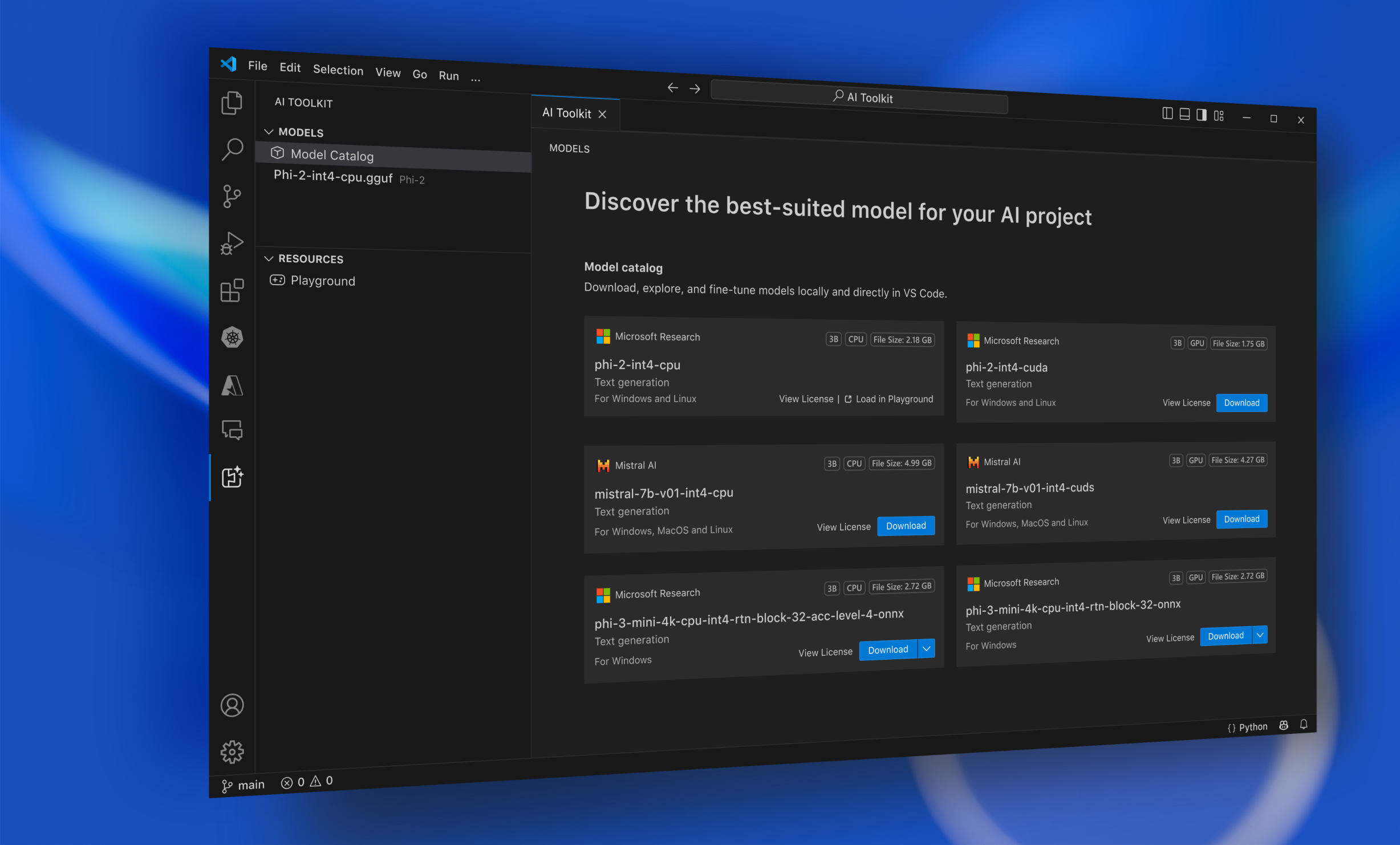
When Azure OpenAI launched, it quickly showed the commercial opportunity for generative AI. In less than six months, it had attracted 23K customers and $45M in monthly annual contracted revenue (ACR), growing 21% month over month. More importantly, that momentum revealed a bigger strategic opportunity: most customers were still experimenting, and much of that demand was happening outside Azure. That created a chance to turn AI interest into lasting platform adoption. The strategy was simple: come for the AI, stay for the platform. My job was to help design that experience inside the tools developers already used every day: GitHub and VS Code.
I joined the AI Toolkit team, split between Microsoft headquarters in Redmond and the Shanghai office, to help shape a brand-new extension for VS Code. My role spanned research, design workshops, service design, UI, prototyping, and product implementation, working directly with engineering and PM partners on a project with high visibility inside Microsoft: it would be demoed live at Microsoft Build in May 2024, and we had two months to get there.
Asking the right questions to design the right experience
The challenge was not just about scope; it was also about timing. In 2024, we were still learning how AI engineers would work with language models directly inside a coding tool like VS Code. I needed clarity on two things: how this product was actually being built across a distributed team, and who we were building it for. That meant learning a new set of technical terms, vocabulary, and workflows in a short time. To ground that work, I used the 5W1H framework—who, what, where, why, when, and how—in workshops with immediate partners, aligning the team around a shared understanding of the user, the problem, and the opportunity.
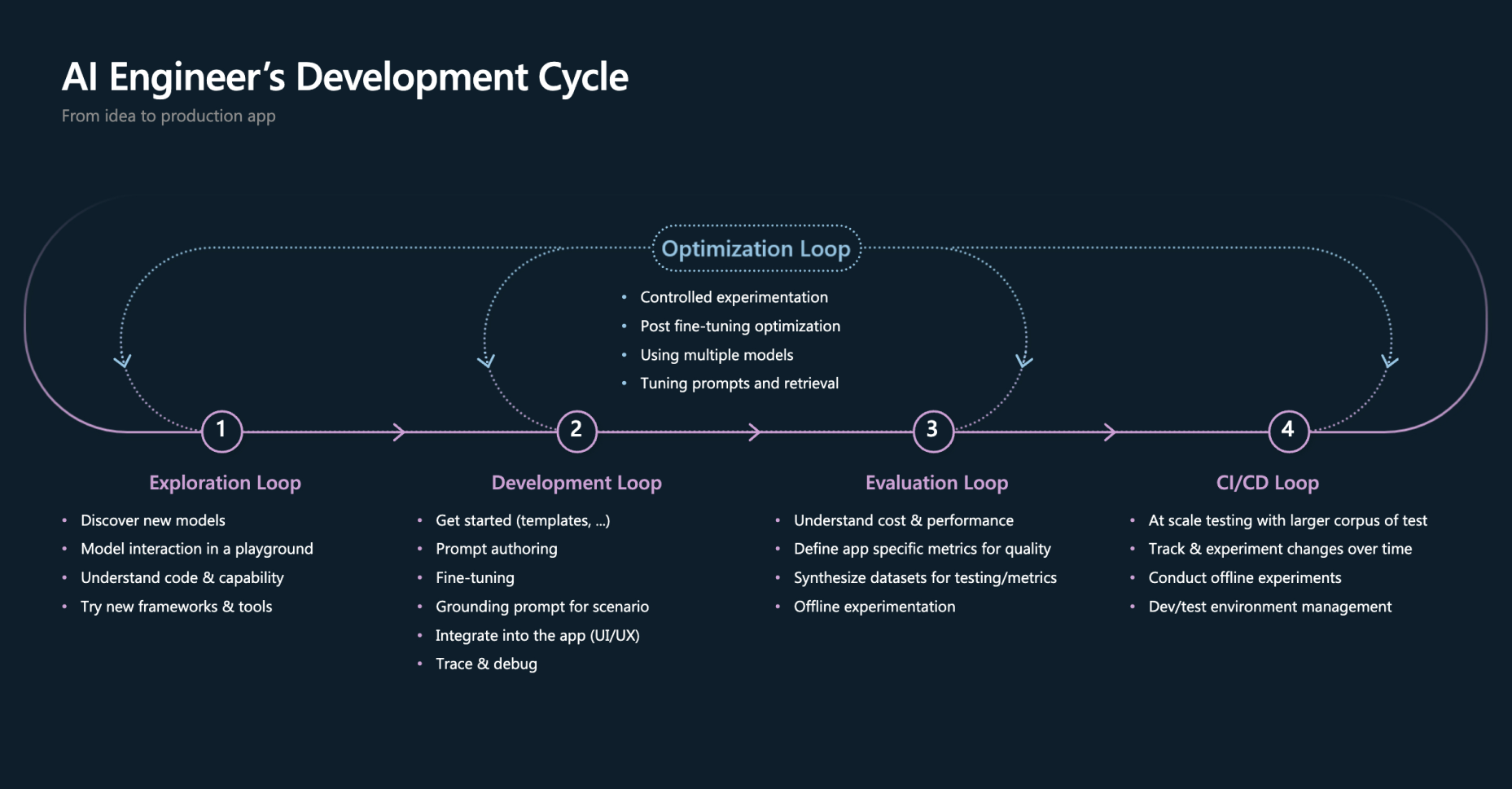
The AI engineer-developer cycle shows how the multiple iterations before its implementation in code.
What emerged from those workshops was a broader user group than we expected. It included developers just beginning to explore language models and experiment with prompts, as well as more advanced users like AI engineers already deep in fine-tuning and iterative evaluation workflows. The product had to support a broad range of users, helping people get started quickly without locking them into an overly complex workflow too early.
Defining the experience from scratch
I wasn’t handed a clear spec doc. Instead, I had a strategic direction and a broad sense of what should help developers adopt AI, but no defined interaction model to anchor it. Part of my job was to turn that ambiguity into concrete, user-facing concepts: what does “exploring a model” look like as a real interaction? What does “crafting a prompt” feel like inside an IDE? What does evaluating output look like when teams need to iterate quickly, not just run a single prompt once?
There was no existing product to reference for this. I had to define the experience’s foundations from the ground up, grounded in strategic intent rather than a traditional requirements doc. That meant moving from abstract language like “AI productivity” to specific moments in the developer workflow: where users start, what they need to learn, and how the product helps them move from experimentation to production.
Mapping the AI workflow
Building with AI is an inner loop, not a single step: exploring a model, crafting a prompt, running it, evaluating the output, fine-tuning, and iterating again, often dozens of times before something is production-ready. That loop crossed multiple tools and mental models, and no one on the team had a shared picture of it end to end.
I built a service design blueprint to make that loop visible: it showed the phases, the connections between tools, and the jobs-to-be-done at each step. This became the reference point the whole team used to reason about scope and sequencing for the two-month timeline.
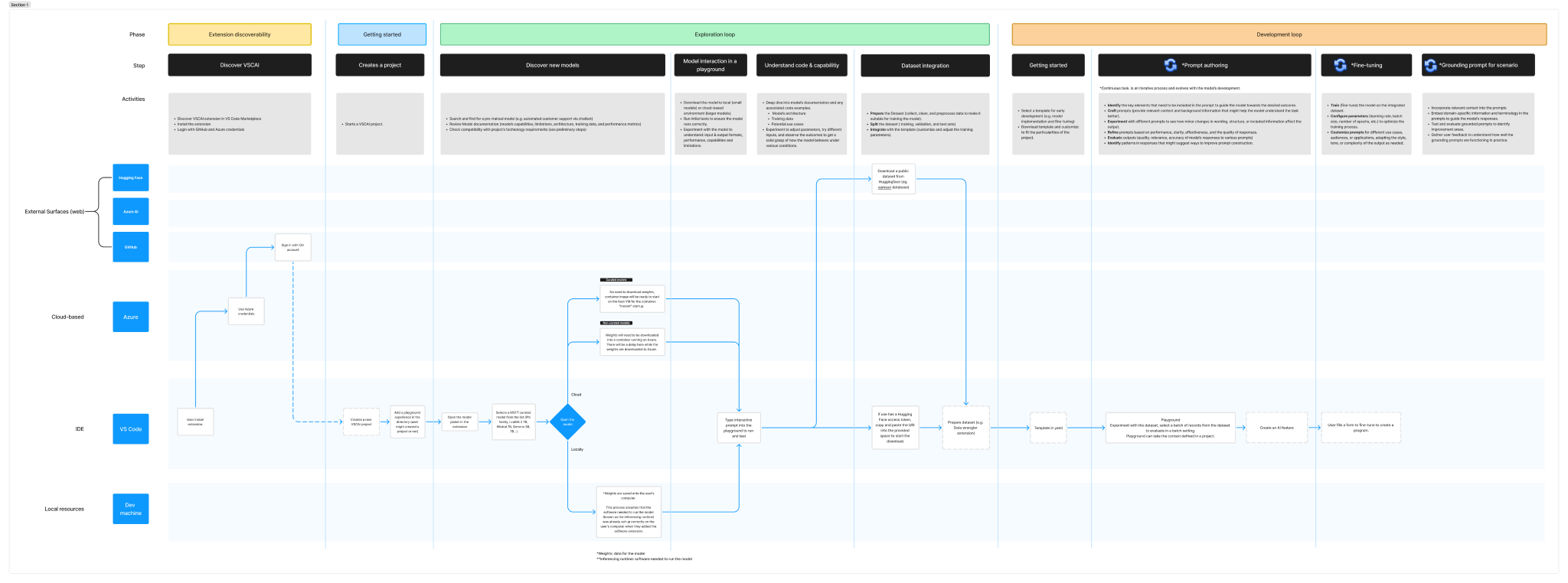
This blueprint digs into the platforms and activities that happen during model exploration.
Using design artifacts to align on the MVP
Because the team was engineer-led, diagrams were the fastest way to align around the user journey and product direction. I used flow diagrams early and often to surface gaps in the experience, then moved into low-fidelity wireframes to define the extension’s information architecture and core functionality. These artifacts helped clarify the MVP for Build and its path to scale. I also shared them with other designers across my immediate team in the Developer Division, who were also learning how to integrate AI into developer tools and products. I used those sessions to walk through the extension patterns and design system conventions I was still learning myself, which helped spark broader conversations across the team.
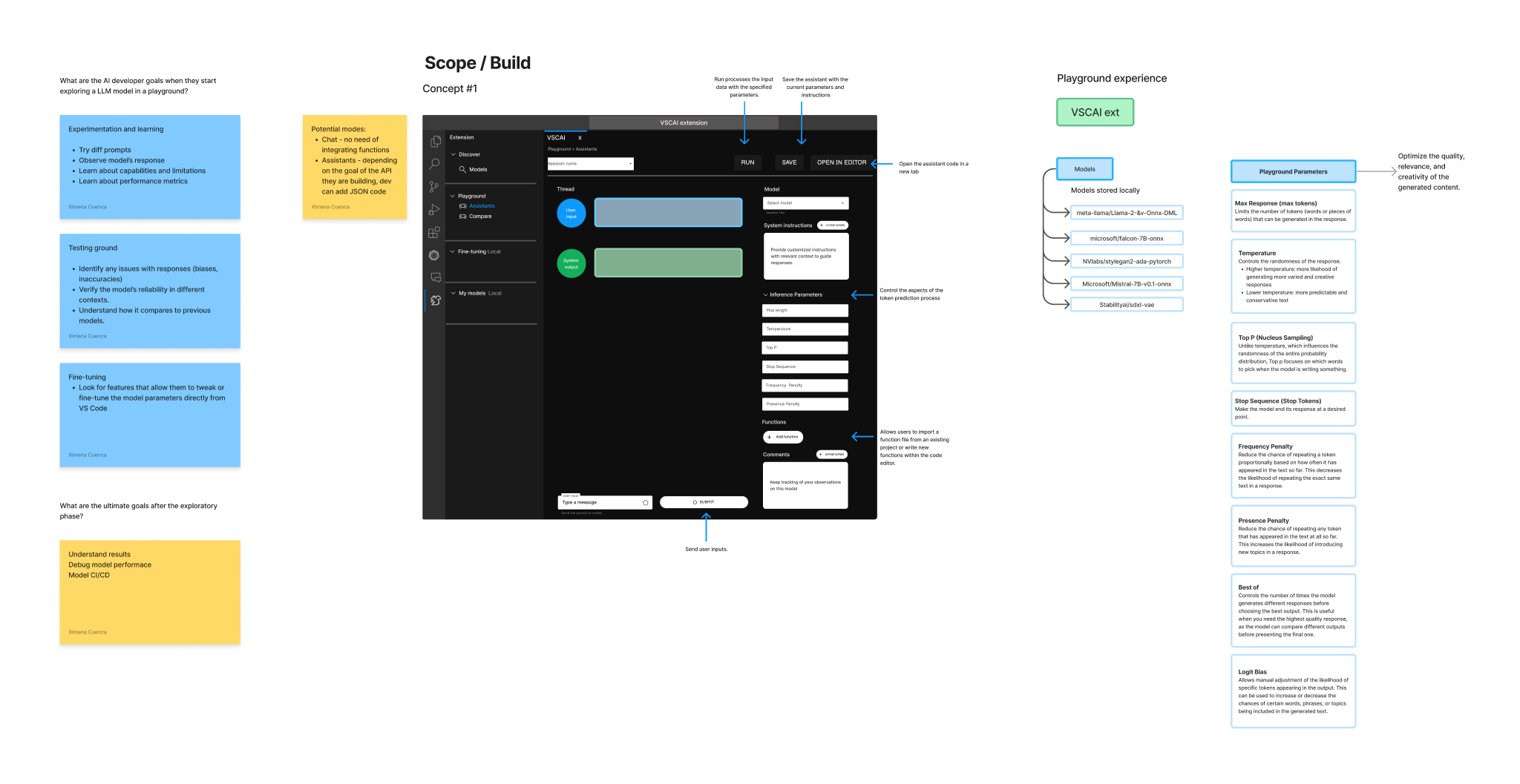
Low-fidelity wireframes translated the concept into a clear interaction model.
Bridging strategy and engineering
Getting alignment meant bridging two different perspectives. The strategic team in Microsoft headquarters, including PMs, leadership, and the Principal Architect, was setting direction, while the engineering team in Shanghai was building it. Because I was the only designer in headquarters, I had to work ahead of time and make every decision clear enough to carry across time zones. The challenge was not just distance, but misalignment: sometimes the product direction and the technical realities did not fully match. I used Figma prototypes to walk both teams through key scenarios, capture async feedback, and help resolve those gaps before Shanghai had to deliver.
Figma prototype of the model download flow, showing how users picked a model from the catalog and brought it into the playground.
Shipping the MVP for Build
The AI Toolkit shipped as a first version that let developers and AI engineers explore a curated model catalog, bring local models into the workflow, and tune generation settings in a collapsible right panel inside the playground. From there, they could compare outputs across models, iterate quickly, and move into fine-tuning without leaving VS Code. The most important product moment was not just that a model was available in the editor; it was the ability to test it, tune it, and measure whether it actually did the task they wanted. As John Lam, the principal architect on the project, said at Build, “How do I measure quantitatively and qualitatively whether or not the AI is doing the task that I wanted to do?” That question became the product’s core promise. It was presented at Microsoft Build 2024 and is available today on the Visual Studio Marketplace.
Microsoft Build demo of the first version of AI Toolkit for VS Code.
Even after I moved to another product, the AI Toolkit’s story kept going through org changes and new designers who picked up the work. The extension was rebranded as Microsoft Foundry Toolkit for VS Code, reaching the goal we’d set out for it: a fully integrated Azure AI ecosystem inside VS Code, expanded well beyond its original scope into a platform for building agents.
By its General Availability release, the extension had grown to 1,381,500 installs on the Visual Studio Marketplace and 130K monthly active users. The GA launch itself was a coordinated, cross-team effort spanning Europe, China, and the U.S. It’s the kind of milestone that validates the original bet: get the foundations right early, and the product can keep scaling well past the team that built its first version.
Project credits
- Team: AI Toolkit product team across Redmond headquarters and Shanghai office; PMs, leadership, and the Principal Architect in Redmond; engineering and UX design peer in Shanghai
- My role: UX design, content, service design, interaction design, prototyping, and cross-team alignment